
Cloud Computing Services for Modern Manufacturing
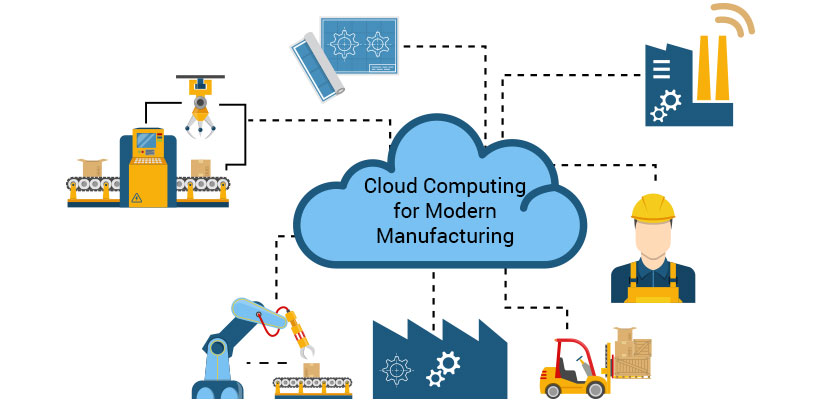
Globally, many manufacturing companies are expanding to new horizons and diversifying their operations, thanks to the advent of the Industry 4.0 revolution. Rapid transformation is taking place in the technology forefront, and cloud computing plays a pivotal role in bringing about this change. According to Gartner, “Cloud computing is a style of computing in which scalable and elastic IT-enabled capabilities are delivered as a service using Internet technologies.” Cloud Computing Services offer the following benefits for modern manufacturing practices: A TBR report states that “Agile manufacturers are planning to move their mission-critical applications to the cloud while citing security, integration, and performance as factors”. Cloud computing services can be deployed as Software as a Service (SaaS), Platform as a Service (PaaS), or Infrastructure as a Service (IaaS). Initially, the manufacturing industry leveraged cloud computing to improve primary processes such as warehouse and quality management. It is also being utilized to drive paperless workplaces, thanks to the high connectivity it provides. Cloud computing is also making it possible for companies to look deeper into data sets, and derive insights into equipment and process performance. This helps to track and analyze product quality, facilitating the improvement of quality levels and creating a competitive advantage for the company. Gauging equipment effectiveness helps analyze the health of machinery and tools and extend their performance. Discrete manufacturing involves build-to-order and configure-to-order workflows, which require real-time integration of multiple applications. Cloud computing contributes by offering seamless data transfers, reducing cycle time, and enabling easy recording of each process in detail. It provides a foundation for connected manufacturing. Another important reason cloud computing is being adopted more widely is that it empowers managers to assess supply chain performance, which contributes to better decision-making and forecasting. What’s Next? Cloud computing’s connectivity for machines, systems, and stakeholders is positively impacting modern manufacturing companies at various levels. At the enterprise level, its impact will be seen in the way how companies efficiently and seamlessly manage their operations and system integrations. This includes all the high-level processes such as production, finance, ERP, HR, training, and others. At the production level, cloud computing will change the way products are designed, developed, assembled, and packaged. It will play a key role in connected manufacturing that uses new technology such as the Industrial Internet of Things (IIoT), 3D printing, and generative design to operate seamlessly. To derive maximum benefits from cloud computing, modern manufacturing companies need to have a comprehensive cloud strategy to maximize their Return on Investments (ROI). Cloud computing partners should be chosen based on their solution’s scalability, security, flexibility, process documentation, and training capabilities. InApp has over 22+ years of experience driving transformation with best-in-class manufacturing solutions. If you are looking to deploy cloud solutions for your manufacturing concern, please contact us, and we would be glad to help.
6 Goals of Cloud Migration
By now most organizations whether big or small have a cloud migration strategy. The hype around cloud computing services is too difficult to ignore. But the goal in migrating to the cloud should be much more than just the cost-saving or cost rationalization that happens with moving your infrastructure off-premise. There are a number of other benefits that you should aim for while moving to the cloud. You can aim to make your system more robust and fault-tolerant. It should not capitulate with just minor non-critical errors. You should also aim to develop a scalable system. You can easily relate to this right now. You probably have a system that is a huge monolith. There are dependencies all over the code. The only way for you to scale up your processing capacity is to create more instances of your whole system. But with the cloud, this is no longer a compulsion. With the cloud, your underlying hardware has become code. You have been given the flexibility to create as many small processing systems or storage systems or N/W points as you may like. You can therefore now break down your monolithic system into many micro-systems and use the flexibility of the cloud to bring in scalability. With your systems becoming robust and scalable, your next goal should be agility. It is a natural consequence of robustness and scalability. Once your system is robust you can think of making more changes to your system without fear of breaking it down. The above graph shows the relationship between the changes and system availability in general. As the number of changes increases, the system becomes unstable and consequently may be offline more often. It is very difficult to push the graph rightwards to bring about more system availability with a higher level of change. But in today’s real world, you have to bring in frequent changes to meet business requirements. It is what makes the organization agile. So as you make your system more robust, you aid in agility. Scalability also aids agility. Scalability is both ways: up and down. You can scale up to increase your productivity if the business so requires it and also scale down your productivity when you experience a lull in business. Another goal to aim for with cloud migration is high performance. Performance means getting more out of your application. It requires you to make your system more efficient. Bottlenecks have to be removed. The cloud gives enormous flexibility to do so. As has been mentioned before the cloud allows for the hardware to be in the form of code. You can therefore easily deal with hardware-level bottlenecks. Security is another area that has to be dealt with during cloud migration. Your goal should be to transform the security of your application. Security tends to be the most discussed topic related to the cloud. People are generally spooked by putting out data on the cloud. But moving to the cloud allows you to completely rethink your security protocols. The main service providers like AWS, Azure, etc, may actually have better security than your own systems. They may also take care of many functions for which you have employed armies of sysadmins. Now in this environment, you need to identify the problems such as the possibility of external attack, internal sabotage, human error, etc. Each would require a different type of strategy to combat. You have to consider the handling of sensitive client data and how to encrypt the data better. So there you have it, the 6 Goals of Cloud migration: Contact us today to transform your application software landscape.
4 Key Factors When Choosing Cloud Computing Services Provider
For smaller firms, one of the biggest benefits of moving their operations to the cloud is that they can focus on the business at hand and let the cloud-based service handle such worrisome IT concerns as security, maintenance, backup, and support. With an increasing number of companies offering an ever-growing menu of cloud computing services with options ranging from AWS, and Rackspace to google cloud, choosing a cloud service provider can be a daunting task. To help you overcome this challenge, below are a set of key points to be considered when choosing a cloud provider. Key points to be considered when choosing a cloud computing services provider 1. Business Health & Process Business knowledge and technical know-how. The provider should understand your business and what you are looking to do and be able to match it up with their technical expertise. Compliance audit. The provider should be able to validate compliance with all of your requirements through a third-party audit. Financial health. Looks for the provider’s track record of stability and their healthy financial position with sufficient capital to operate successfully over the long term. Organization, governance, planning, and risk management. The provider should have a formal management structure, established risk management policies, and a formal process for assessing third-party service providers and vendors. Trust. You should like the company and its principles. Check the provider’s reputation and see who its partners are. Find out its level of cloud experience. Read reviews and talk to customers whose situation is similar to yours. 2. Security Practice Security infrastructure. There should be a comprehensive security infrastructure for all levels and types of cloud services. Security policies. Well-laid-out comprehensive security policies and procedures should be in place for controlling access to providers and customer systems. Identity management. Changes to any application service or hardware component should be authorized on a personal or group role basis and authentication should be required for anyone to change an application or data. Data backup and retention. Policies and procedures to ensure the integrity of customer data should be in place and operational. 3. Technical Capabilities Change management. A documented and formal process for requesting, logging, approving, testing, and accepting changes is essential for a streamlined change management process. Hybrid capability. A hybrid cloud gives the customer the mixed advantages of a public and private cloud. Even though you may not be using this type of model, a service provider supporting this model can make your future transition easier. This is an advantage that you may wish to exploit at a later time. Ease of deployment, management, and upgrade. Make sure the provider has mechanisms that make it easy for you to deploy, manage, and upgrade your software and applications. Standard interfaces. The use of standard APIs at the service provider helps your organization to easily build connections to the cloud for data extractions and transfers. Event management. The provider should have a formal system for event management that is integrated with its monitoring/management system. 4. Administration & Support Performance reporting. Performance reports from the provider auto-sent or manually extracted help you in continuous performance monitoring Service Level Agreements (SLAs). Providers should be able to promise you a basic level of service. Check if the agreed SLA can meet your IT business objectives. Billing and accounting. An automated billing system helps you to monitor what resources you are using and the cost, so you don’t run up unexpected bills. Check if there are dedicated helplines for support billing-related issues. Resource monitoring and configuration management. Established providers do provide their customers with controls to track and monitor services provided to customers and any changes made to their systems.
Cloud Testing: A Fundamental Step to Successful Cloud Transformation
Choosing to migrate to the cloud differs from company to company. Many reasons include scalability, performance, upgrading infrastructure, etc. However, the one constant involving cloud migration remains rigorous performance testing. Even though Cloud promises scalability, the reality is that applications cannot always scale up correctly, even when running on appropriate infrastructures. We have seen enterprises moving to the cloud without proper testing meet with server breakdown issues, including database errors, and website crashes that can be costly in terms of resources and time. Thus we need to understand, that testing plays a key role in cloud migration regardless of the environment. Performing load tests in a cloud is not the same as testing in a traditional environment. Meticulous testing that tests your servers to the limit will make sure your systems are well-equipped to handle peak loads. Issues that come up during migration can be resolved before the cloud environment goes live. Make sure all applications and operations are comprehensively load tested and run flawlessly. Types of Testing To maintain a stable and secure environment, proper testing protocols including general performance and compatibility testing, stress and load tests, and vulnerability testing should be implemented. Once the migration has been completed, and the new application starts working on the cloud – functionality tests need to be carried out on the data and app. Load testing and security are the next steps in the process. Load testing deals with testing the app at peak loads. This makes sure the auto-scaling functionality is working as it should and this will help in identifying the maximum connections that can hold before a case of failure. It can also provide valuable information such as the performance metrics of the application and average load time etc. Server and application-side security should be a part of vulnerability testing: Assess the new cloud environment and make sure there are no server/app liabilities and all data is completely protected. This may also include basic security and malware scanning. Testing Best Practices When you’ve finalized that testing must be part of the migration process, it’s important to familiarize yourselves with the industry best practices that may help you with critical insights and awareness about your cloud environment. Right people and resources in place. Once an issue is identified, it has to be dealt with immediately. You need to have experts to handle any programmatic errors, at your beck and call. Be sure to schedule any personnel or resources ahead of time so they can be available when you need them – this helps to avoid unnecessary delays or expenses. Engage with end-users. Make your end users test the functionality of your app comprehensively. It is advised to avoid outsiders or third parties at this level and make sure only those most familiar with the systems are involved in the testing process. Ongoing testing and monitoring. Testing is a process, not an event. Ongoing performance, security, and load testing are most required, mainly for those companies that constantly change their websites or update apps. Implement a plan for regular quarterly testing and analyze test reports, before taking action. To make sure your system is functional, robust, and secure – monthly testing would be pretty good. Cloud Transformation boasts of reduced costs, scalability, and flexibility making it a positive choice for most enterprises. But scaling is not the end solution – continuous and rigorous testing and monitoring need to be executed to avoid broken apps and website dysfunctions. Adhering to the testing best practices would be the best choice to avoid damaging downtime in your cloud environment.
Webinar on Moving to the Cloud Using Micro-services (Recorded Version)
Here’s a recorded version of our webinar: Moving to the Cloud Using Micro-services! Watch and share. Speaker Profile: Mr. Anil Saraswathy is the CTO of InApp India. He has over 28 years of experience in the field of computer software development. He has held leadership positions at Fischer International, HCL (Hindustan Computers Ltd), IESL (now India Satcom Ltd), and Verifone (now part of HP). He has done path-breaking work in the areas of Cloud Computing Services, Microservices, Custom Web Application Development, Enterprise application development, etc. He is also an avid programmer in Python, Ruby on Rails, Java, C++, PHP, and JavaScript.
Cloud-based Disaster Recovery for Your Business

Enterprises worldwide including SMEs, Startups, and Fortune 500 leverage technology to take their business to the next level. Most critical transactions or data transfers happen online, which are vulnerable to data hacks. Hence, it is always better to have a data protection and recovery plan, in the case of the occurrence of cloud-based disasters. Cloud-based disaster recovery solutions refer to the task of replicating data or an entire virtual machine to the cloud. Many data centers have inbuilt disaster recovery mechanisms. A few steps to ensure you have a proper disaster recovery plan; Go over your Requirements: Assessing your needs should be the first priority. This will help in determining the infrastructure & configuration required for cloud-based data protection. Identifying a solution partner/ provider: The second step after you’ve tabulated your requirements is to choose a reliable cloud-based disaster recovery solution partner/provider that will meet your needs. Always look for reviews and satisfied clients before coming down to a conclusion. Check on Monthly Costs: The net payable cost depends on items including monthly subscription fees, bandwidth usage, storage space, number of virtual machines (VMs), etc. Cost is always a factor when on Cloud, hence always tabulate monthly Strategize Bandwidth Usage: Always have a strategy in place to avoid a disaster that may occur due to over-consumption of bandwidth on a certain website or application. This will help in providing the necessary bandwidth for backup. VM Replication: For Image-based recovery and mounting & extracting cloud-based copies, VM Replication techniques need to be applied. Many enterprises use this method to use the cloud for disaster recovery.
8 Reasons Why You Should Move To The Cloud Now!

Migrating your application to the cloud is not an amateur task. An expert has to take care of the environment and make sure your app runs smoothly in the cloud and is secure by all means. Still doubtful on whether to choose cloud? Here are 8 reasons why you should move to the cloud: 1. Speedier Deployment Deploying your applications and services in the cloud quickly is one of the major advantages of migrating to the cloud. There are multiple options available that help you set up servers and other resources in very few numbers of clicks. This is obviously much simpler than the traditional purchase of servers, installing OS, and placing it on a network. 2. Advanced Security Most cloud providers such as AWS, Azure, and Rackspace take care of tougher security issues like unwanted traffic accessing your virtual machine. They also ensure automatic security updates are applied to the system avoiding vulnerabilities from the latest threats. 3. Less Infrastructure Complexity Cloud is known for its easy accessibility. It does not confuse you with the complexity of infrastructure like data centers. You don’t need to do additional processes to activate services, just fill out some info that is required, and your necessary services are activated. It’s that simple. This can save quite a bit of time, as those particular complexities are no longer a part of your process. 4. On-the-Go Monitoring Cloud Computing services have in-built monitoring systems that notify you when an application or machine has potential issues or is actually experiencing an outage. This saves a lot of time compared to the traditional tracking of service status. 5. Auto-backup and logging of key metrics When talking about continuous monitoring, backup, and logging services are extremely important, especially if you need to perform disaster recovery from an outage and see where things went wrong. The backups will allow you to get things up and running again, and the logs may provide some critical information to help you find out the reason for the issue. 6. Flexibility for Employees You don’t need to be at a specific location to deploy, update, or fix issues when using the cloud. This makes it a more tangible solution when compared to the necessity of being on-site. The unique consistency in choosing and deploying services makes it much easier to collaborate in the cloud. 7. Reduced Datacenters The introduction of the cloud platform has tremendously lowered the usage of data centers. Choosing the cloud for your organization may downsize your data center usage to a single one, just for the sensitive information or even zero. This will surely bring down the operational costs of running multiple data centers. 8. Efficient Cost Management Auto-scaling is something provided by most IaaS providers, which allows you to use more services when you need them and turn them off, when not in use. This technique helps even more in financial savings as you are charged only for the time you use the service or keep the machine running. And the best part is that InApp can assist you through your entire journey to the cloud. Ask for Help
Moving Enterprise Applications to the Cloud

The Lift and Shift Model has been much appreciated in the cloud migration process for enterprise applications. It’s 10x cheaper than the traditional methods. While migrating to the cloud, there are some rules that need to be followed in the Lift and Shift model : Kill and Move ahead: When a server instance goes berzerk, and functions improperly – don’t waste time fixing it – just kill it and redeploy. The solid opinion is to terminate old instances and deploy new ones. This may not be the case if you have an application that was solidly built on data center architecture. Move the essentials only: We all know the messed up cable patches in our servers. One wrong color code and all goes wrong. Cloud migration is a chance to throw away the jumbled patch panel and re-authenticate security and access management. While you will need to move some of your infrastructure services along with the application, make use of the situation to organize your application strategy. Unique Identity: Running multiple identities is risky and inefficient. IdAM (Identity Access and Management) needs to be centrally monitored and used at all locations. Adding controls that identify a user’s location and devices, combined with options for two-factor authentication and one-time passwords, can provide defense against social engineering. Continuous & Close Monitoring: Although Cloud takes away many layers of direct architecture from our attention, giving us more time to be focused on the necessary – we would need to continuously monitor the cloud to plan for troubleshooting scenarios. This would also keep us updated on the security and performance of the app. Always have a Plan B: Keep a Plan B always ready – disaster recovery and/or business continuity should always be something in your short-term goal. A foolproof architecture design and efficient data center should help this to an extent. This might turn out to be costly but will surely help your organization in the long run.
Cloud Computing disrupting the life of CIO

To understand the impact of cloud computing on the life of the CIO we have to rewind the clock to the time before the cloud. We can picture a marketing executive struggling with an email marketing tool. He goes cribbing to the IT admin guy. The admin refers the problem to the CIO. The CIO then decides and only on the basis of this decision can the marketing department expect a resolution. If the software has to be replaced, probably it will be done by the admin. Now cut to today. The marketing guy like always is cribbing about the tool he is using. It is convenient to put the blame for a bad quarter on the tool, rather than on him/her. But this time the marketing guy needn’t go to the admin. He can simply search for a Saas-based solution. Get budgetary approval from his/her boss. No installation is required its plug and play. The CIO’s role has been completely eliminated. So the CIO must be overjoyed right? Less work & the same pay! But hang on. Cut to 3 months down the line. Now the Saas solution has the problem. But the Marketing guy doesn’t call the Saas provider, he calls the CIO. Or maybe he does call the Saas provider but doesn’t understand a word of the Jargon thrown at him by this fancy tech fellow and ends up calling the CIO. So till the time, everything was fine and smooth, the CIO was not involved, but as soon as the problem starts he has to troubleshoot. But by now the company has reduced IT, staff because the cloud has reduced their requirement. So the CIO doesn’t have a team to swoop down on the problem and solve them. He has to tackle the problem by talking to the Saas vendor. The Management Expectation The above was just an example of how the role of the CIO role is changing. Even the management of companies is looking at CIOs differently. In earlier days the CEO wouldn’t probably need to talk to the CIO. But today with technology front and center, CIO is driving strategic decisions. Expectations from technology have completely changed. Most people in management now believe that IT innovations in their company are slower than their competitors. CIO in such a scenario has to have the market knowledge of the innovations driving the business and the technical knowledge to implement those solutions. This has become the hallmark of a successful CIO of today. He/She has become the Chief Innovator, rather than someone just handling the IT infrastructure. The Thunder from the Cloud So let’s list down the lightning bolts that the cloud is emitting and how it is causing disruptions: 1. Capex becomes Opex Back in the 90s and even early 2000s IT infrastructure was a huge cost. For some small companies that are still not in the cloud, it continues to be a huge cost. The CIO was then brought in to understand what Infrastructure to bring in and explain to the board and management. That was the inception of an IT guy in the boardroom of companies. All employees had just started to use computers. So computers had to be purchased, the related software had to be made; servers had to be set up, etc. Today, with cloud computing, the huge server is obsolete. Saas-based solutions are available for each problem. No huge budget has to be approved at the beginning of the year. It cannot be, as one year today, is a lifetime in software innovations. Companies are forced into being agile. But the CIO has not walked out of the boardroom. Instead, rather than playing the cameo at the beginning of the movie, he has become the star attraction. He is no longer an annual fixture in the board meetings; he has become a permanent member. Probably the most important one. 2. Shrinking In-house teams In-house IT was always costly. The cloud has enabled the teams to be shrunk further. The CIO now works with a bare minimum of staff. Earlier for every 20 systems, there would be an administrator. Now every 1000 systems might have one administrator. For smaller companies, there may not be an administrator. They might as well use the administrator of the cloud provider. Anyways all the hardware resides on the cloud. The structure of the IT team has therefore completely changed. The skill of the IT internal staff is now in understanding the virtual machines. They need to be effective vendor managers so that they can manage the army of Saas vendors. 3. Less power to say No The role has changed from an IT administrator to a strategic guy. As the example at the beginning of this blog demonstrated, the guys in the company can just buy any Saas solution off the shelf. If the CIO objects, he/she would become an impediment to change. He/she has less power now to say No. But the CIO has more power in strategic decision-making. He/she can proactively suggest solutions. He/she needs to have the ability to understand the different alternatives for a particular solution. 4. CIO as a Businessman The day is not far when instead of the CIO a master’s in technology will actually be the Master in Business administration. It is now incumbent on the CIO to make the company competitive. CIO has now become the quarterback. Contact us today to transform your application software landscape.
Top 5 Emerging Cloud Computing Trends

Till a few years ago, cloud computing was just a technological fad with little practical value and more hype. In recent years, cloud computing has altered the paradigm of how software is built, data is stored, and how it is accessed. As IT continues to play a significant role in how companies operate, cloud-based platforms and infrastructure have helped companies to streamline their operation, become more efficient and thus reduce IT operations costs. November is coming to an end and we are a month shy of 2017. In the year gone by, there have been rapid changes in cloud migration and cloud-allied strategies. Below are the top 5 trends in cloud computing services. 1. Rapid Growth in the Adoption of Cloud Computing The availability of cloud-based applications (big & small) is in abundance these days. According to reports published by Gartner, there has been a 250 percent increase in revenue from worldwide cloud services in the last two years. As of today, a significant number of organizations intend to migrate to cloud-based applications. The adoption of cloud storage and applications has helped CIOs cut down unsustainable overheads on data storage, a prime consideration for driving the adoption of cloud computing. 2. Go Mobile – The Latest Mantra Smartphones and tablets have become a basic necessity of life. Our lives revolve around these gadgets such that they have now a major impact on how business is transacted. Employees who work at sites away from the office prefer to get work done on the go without having to step into the office. Companies are tapping the benefit of convenience and productivity using mobile-compatible cloud-based applications. The ability for an application to work on mobiles is a key thrust area when designing cloud-enabled application 3. Social Tools, Cloud, and Collaboration The rapidly and ever-changing cloud computing technology is considered to be one of the core principles of the digital era. The close integration of cloud technologies and analytics has been rapidly growing. In addition to being flexible, cloud-based applications are more social than traditional onsite software. In today’s work culture, tools like chat, micro-blogging, etc play a significant role in collaboration among peers. As people are getting used to these tools, customers now have begun to adopt these non-conventional modes to communicate with prospects and fellow employees. 4. Best of Both Worlds, Hybrid Cloud the Preferred Mode Hybrid cloud computing has been gaining popularity and is still the most preferred mode of deployment among big enterprises. A hybrid cloud is a combination of a public cloud and a private cloud for data storage and retrieval. It thus provides the benefit of cost-saving and convenience offered by the public cloud and the ability to add layers of security and customization to the private cloud. With this architecture, enterprises are able to house critical and sensitive information on their private cloud and non-sensitive information on the public cloud. With the twin ability of security and convenience, more companies are opting for this mode of deployment. 5. Security and Data Privacy Key Focus In today’s world of cyber hacks and data theft, data privacy continues to be the key concern when companies strategize their migration to the cloud. With the advent of new technologies, cybercriminals have become smarter. To mitigate this risk, cloud providers and cloud-enabled applications are incorporating a mechanism for developing a secure cloud computing ecosystem. The age-old adage, “change is the only constant in life”, is apt for technology changes too. Cloud computing methodologies are rapidly evolving with every passing year. The future of computing may be hard to predict, but cloud computing will continue to have a significant impact on the IT strategy of every CIO in the years to come.