Let’s see how SAML works in SSO authentication.
Look at the workflow of SSO authentication used in the Google application.
Initially, before the whole process, the partner must provide Google with the URL for its SSO service as well as the public key that Google should use to verify SAML responses.
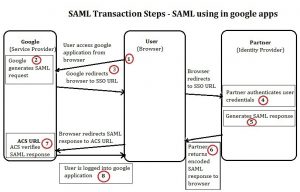
The following steps are the workflow of the entire SSO authentication process. Each step number is plotted in the above figure:
These are the basic principle behind the working of SSO authentication.
Criticisms
1. Valid users logged in to their own intranet application and accessed external host application
Result:- Users should be able to access external host applications since they are valid sso users.
2. Invalid users logged in to their own intranet application and access the external host application
Result:- External application login prompt should show up since they are invalid sso users.
3. Valid user logged in intranet and accessed the external host application and at the same time intranet session expires
Result: The user should be able to work on an external host application even if the intranet session expires.
4. Valid user logged in to intranet, accessed an external application and logged out, and again access an external application
Result:- The user should be logged in to the external application without a login prompt.
5. Valid user logged in to intranet, accessed external application, and then session out from innotas application
Result:- The user should be able to continue working on the external application after expires since a session has already been made with the intranet application, so while the session is out user credentials will be automatically fetched from the browser cache and logged in.
Have questions? Contact the technology experts at InApp to learn more.