Your excavator sits idle at Site B while your crew at Site A waits desperately for the same machine.
Every construction professional understands the chaos that comes with resource allocation, equipment shuffling, and the choice between paying crews to wait or risking project delays. Traditional scheduling methods trap you in reactive mode, constantly firefighting instead of strategically planning.
What if your scheduling platform could detect problems before they happen? Or it could tell you exactly when to move equipment between sites, which crews to shift when required, and the ideal time to order materials so they show up right when you need them, not weeks early, consuming extra space?
AI is changing the way construction teams handle scheduling and resource management. In this blog, we will walk you through how you can use AI for smarter resource allocation and how to start adding these tools to your workflow, step by step.
The AI analyzes historical project data, current schedules, and team availability to suggest the best crew assignments.
For example, if you are scheduling electrical work at different sites, the AI might find that your electrician can oversee Site A in the morning and Site C in the afternoon, while apprentices do routine work at Site B, making the best use of skilled workers.
AI helps you prevent the expensive problem of equipment sitting unused at one site while another site waits.
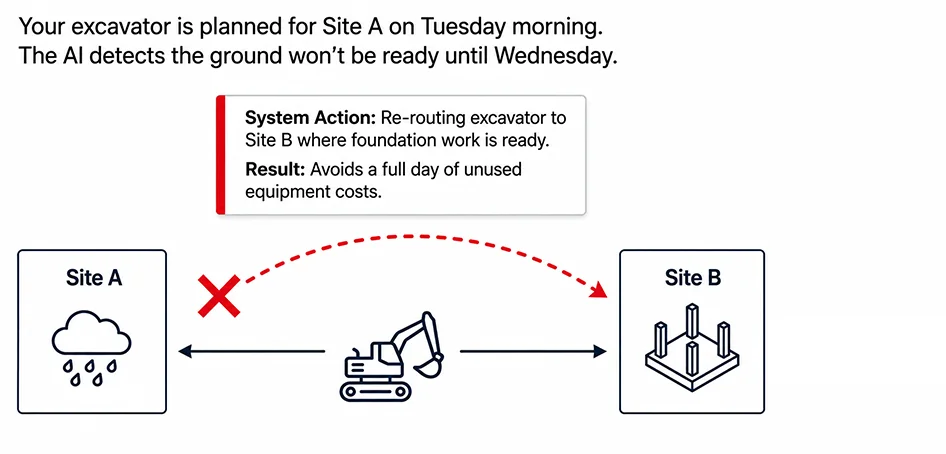
For example, your excavator is planned for Site A on Tuesday morning, but the AI detects that the ground won’t be ready until Wednesday. It suggests moving the excavator to Site B, where foundation work is ready, avoiding a whole day of unused equipment costs.
When weather delays and unexpected problems occur, you need to make rapid adjustments in resource use. AI handles this complexity by considering multiple factors simultaneously.
When rain delays exterior work at one site, the AI system immediately identifies interior tasks for crews, suggests equipment transfers, and updates material delivery schedules accordingly.
AI manages material delivery schedules and reduces on-site storage costs. It tracks your actual consumption rates versus planned rates, automatically adjusting future deliveries.
For example, if you are using concrete 20% quicker than estimated, the system will notify you and recommend ordering sooner so work doesn’t stop.
The success of AI implementation depends on a structured, phased approach. Here’s a roadmap that you can follow:
Evaluate your current state:
Select your AI solution:
Pick a solution that fits your biggest needs. If labor allocation is your main challenge, look for systems that are strong in workforce management. If you are juggling between several sites, focus on tools with solid logistics features.
Create a selection matrix comparing systems on integration with your existing tools, ease of use, and support quality. Schedule demos with your actual project data, not generic examples.
AI requires quality data to generate reliable results. Start with:
Organizing project data:
Setting up current project tracking:
Begin with one project that is not too simple or too complex.
Then
Evaluation and adjustment
Look at specific results: Did the AI lower resource conflicts? Improve equipment utilization? Cut down on last-minute material orders? Use this information to improve your process before expanding.
Deepen system integration:
Build team competency:
Continuous improvement:
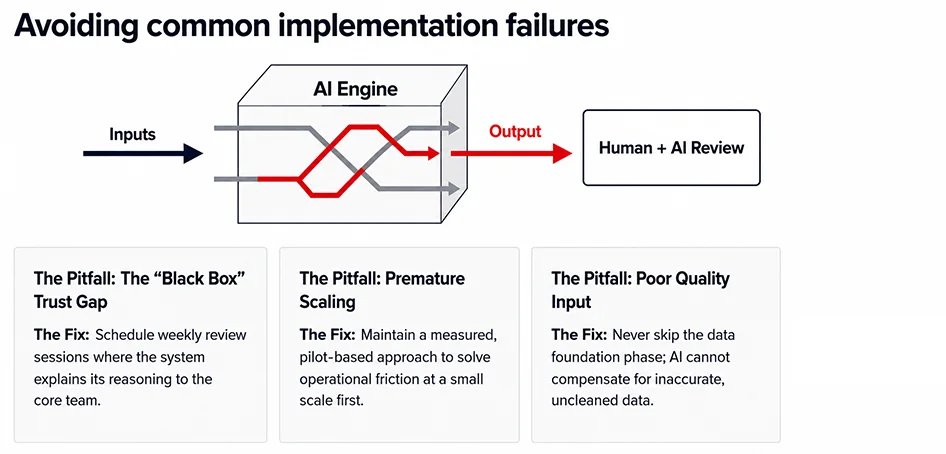
The future of construction scheduling depends on making decisions based on facts instead of guesses. AI helps teams predict resource problems, adapt to changing project conditions, and improve schedules with accuracy that traditional methods find hard to match. Organizations that integrate AI into their scheduling processes today will be better positioned to deliver projects faster, more efficiently, and with greater confidence.
Yes. AI tools can create construction schedules by using proposal details and project requirements. They make scheduling easier, keep track of project costs, and help teams meet tight deadlines.
AI reviews project schedules, past performance, available resources, weather, and other factors to spot risks and suggest schedule changes before delays happen. This lets teams act early instead of waiting for problems.
Yes. AI can monitor how equipment is used, check if projects are ready, and look at scheduling needs to suggest where to send equipment. This cuts down on idle time and makes sure critical machines are available where needed.
Yes. AI is especially helpful for organizations with multiple sites. It can check what resources are available at each project and suggest the best way to share workers, equipment, and materials between locations.
Some benefits include using resources better, fewer scheduling problems, less equipment downtime, lower costs, higher productivity, more accurate planning, and better project timelines.